
Expense Approval Workflows: How to Set Spending Limits Without Slowing Your Team Down
Learn how to build an expense approval workflow with spending limits and approval tiers that improve control without slowing your team down.
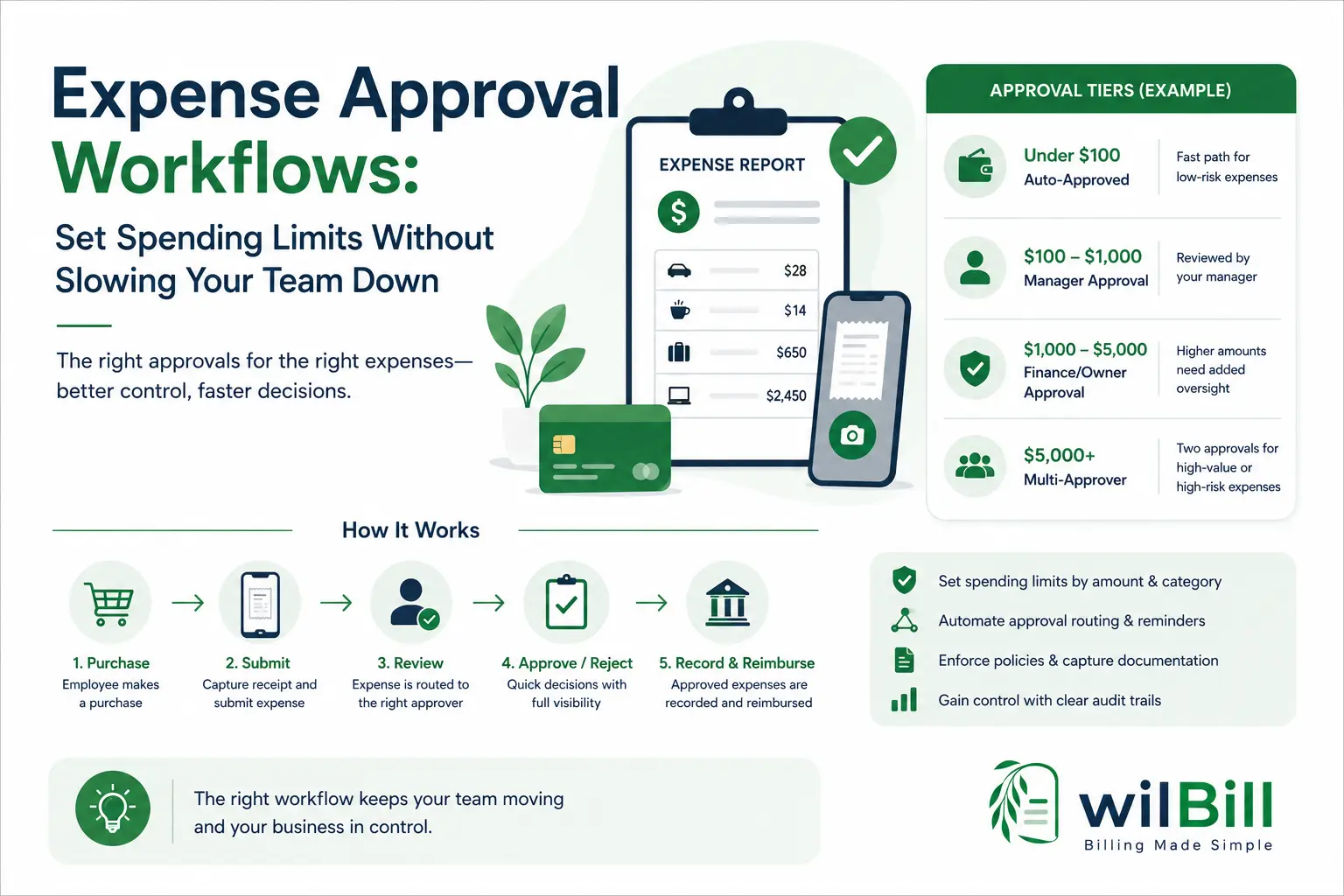
An expense approval workflow is a structured process by which employee expenses are submitted, reviewed, approved, and recorded according to organizational spending limits and risk tiers. Rather than requiring manual approval for every expense, businesses implement tiered thresholds-such as auto-approving routine purchases under $50–$100, routing $100–$1,000 to direct managers, and requiring owner or finance sign-off for expenses exceeding $1,000-combined with risk-based rules for new vendors, recurring subscriptions, and travel.
Key Takeaways
- •An expense approval workflow defines who approves, required documentation, turnaround SLAs, and dispute resolution.
- •Flat approval rules cause bottlenecks on routine expenses while failing to give high-risk spending sufficient scrutiny.
- •Combine dollar-based limits with risk-based rules (new vendors, recurring software subscriptions, budget exceptions).
- •Assign a primary and backup approver to every tier to eliminate operational bottlenecks and delayed reimbursements.
- •Automate approval routing, receipt capture, reminders, policy checks, and audit trails to keep team spending agile.
Expense approval starts informally at most small businesses. Someone makes a purchase, submits a receipt, and gets reimbursed. That approach can work when only two or three people are spending money.
It becomes harder to manage as the team grows. More employees make purchases, managers oversee different departments, and no single person naturally sees every expense before it happens.
The usual response is to require approval for everything.
That creates a different problem: a $12 parking expense can end up waiting for the same approval as a $4,000 equipment purchase.
A better approach is to build an expense approval workflow that matches the level of review to the amount and risk of the expense.
That means setting practical spending limits, creating approval tiers, identifying high-risk categories, assigning backup approvers, and automating routine steps where possible.
This guide explains how to build an expense approval process that gives your business better spending control without turning every purchase into an administrative bottleneck.
Setting the right spending thresholds ensures low-risk expenses move quickly while significant liabilities get verified before funds leave your account.
What Is an Expense Approval Workflow?
An expense approval workflow is the defined process by which employee expenses are submitted, reviewed, approved or rejected, and recorded according to rules such as spending limits, expense categories, departments, and business policies.
A well-designed workflow answers four questions for every expense:
Pre-Approval vs. Post-Purchase Approval
The workflow may happen before an employee spends money, after the purchase, or through a combination of both approaches.
An employee gets authorization before making a purchase. This is essential for higher-value or higher-risk expenses such as equipment, travel, new software, or recurring contracts.
The employee makes the purchase and submits the expense afterward. This is generally more practical for routine, low-value expenses such as parking, office supplies, or small business purchases.
“Low-risk expenses can follow a streamlined post-purchase process, while higher-value or higher-risk expenses require approval before money is spent.”
Why Flat Expense Approval Rules Don't Work
The most common mistake is applying one approval rule to every expense regardless of size or category. This creates two distinct problems simultaneously.
A $20 software subscription does not carry the same financial risk as a $5,000 equipment purchase. If both require the same approver and documentation, the approval process becomes unnecessarily slow.
Employees also become frustrated when small purchases require multiple steps, leading to delayed submissions or ad-hoc workarounds.
The opposite problem happens when a business makes the approval process simple enough to keep small purchases moving.
If every expense follows the same low-friction rule, a significant purchase may receive no more scrutiny than a routine expense.
The Solution: Better Approval, Not Just More Approval
The solution isn't simply adding more bureaucratic approvals. A tiered expense approval workflow allows the level of review to increase progressively as the financial amount or organizational risk increases.
How to Set Expense Approval Limits
There is no single spending threshold that works for every business. A $200 purchase may be significant for one company and routine for another. Instead of copying a generic approval policy, start with your actual spending patterns and build thresholds around them.
Review Your Historical Spending
Look at the last three to six months of employee expenses to gain an accurate baseline. Identify:
Identify Routine, Low-Risk Expenses
Find purchases that are predictable, frequent, and unlikely to create significant financial risk. Examples include:
These expenses are appropriate for simplified, post-purchase auto-approval policies.
Identify Higher-Risk Expenses
Identify expenses that deserve additional review even when the dollar amount is relatively small:
This is where a purely dollar-based approval system starts to break down without risk-aware rules.
Create Your Approval Tiers
| Approval Tier | Example Amount | Approval Required |
|---|---|---|
| Auto-approved | Under $50–$100 | None, subject to expense policy |
| Manager approval | $100–$1,000 | Direct manager or team lead |
| Owner/finance approval | $1,000–$5,000 | Business owner or finance lead |
| Multi-approver | $5,000+ | Two approvers or owner + finance |
These are starting examples, not universal benchmarks. For a business where $2,000 purchases are routine, a $1,000 threshold may create friction. Adjust based on cash position and risk tolerance.
Build Approval Tiers Around Risk, Not Just Dollar Amount
Dollar amount is the easiest way to create spending limits, but it should not be the only variable. A strong expense approval policy combines amount-based rules with risk-based rules.
New or Unfamiliar Vendors
A $150 purchase from a brand-new vendor may deserve more review than a $150 purchase from a long-standing supplier. Approvers should confirm vendor legitimacy, necessity, and whether existing vendor contracts already cover the requirement. (Learn more about vendor management & billing controls).
Recurring Commitments
A $40 monthly subscription seems small. But $40 per month equals $480 per year, and dozens of unmanaged tools quickly inflate your recurring expense base. Subscriptions should require explicit approval and renewal reviews.
Travel and Entertainment
Travel, client meals, and entertainment are more subjective than operational supplies. Businesses frequently use lower approval thresholds and require clear attendee lists and business purposes for these categories.
Budget Exceptions
An expense can be risky because it pushes a department over its monthly limit. For example, a $450 purchase that causes a team to exceed its $5,000 monthly allocation should automatically trigger finance escalation.
Sensitive Purchases Requiring Universal Review
Certain sensitive categories should warrant additional review regardless of dollar amount: legal counsel, security tools, financial advisory, proprietary data tools, and any contracts involving confidential customer information.
Example Expense Approval Workflow
Consider a 20-person company with employees making regular operational purchases. A balanced workflow operates smoothly across five key tiers:
Expenses Under $100
Employee makes purchase → receipt is captured → expense is logged → no manual approval unless an exception or policy violation is flagged.
Expenses from $100 to $1,000
Employee submits receipt and business justification → direct manager reviews → expense is approved or rejected.
Expenses from $1,000 to $5,000
Employee submits receipt, justification, and budget information → manager reviews → finance or business owner provides final sign-off.
Expenses Over $5,000
Employee requests approval before purchasing → department lead reviews → finance or owner reviews → dual approval is required before order placement.
New Recurring Subscription
Regardless of dollar amount, employee requests pre-approval → approver reviews business need and renewal terms → subscription is authorized or rejected.
How to Build an Expense Approval Hierarchy
An approval hierarchy defines who reviews an expense at each tier and what happens if the primary approver is unavailable. A good hierarchy is simple to understand and reliable to operate without constant manual escalation.
Assign Primary and Backup Approvers
Every tier must have a designated backup. If an approver is out of office, a $1,500 purchase shouldn't sit in limbo for two weeks.
Keep the Hierarchy Shallow
Small businesses rarely need 5–6 layers of sign-offs. Two or three meaningful levels are easier to maintain:
- Direct Manager
- Finance or Owner
- Dual sign-off for exceptional expenditures ($5k+)
Match Approvers to Context
Seniority isn't always the right filter. A department lead best understands whether a technical tool is necessary, while finance understands total cash position and budget allocations.
Set Approval Response SLAs
Define clear turnaround expectations:
- Routine manager approvals: within 24 hours
- Higher-value approvals: within 48 hours
- Urgent operational orders: defined escalation route
What Information Should Employees Submit?
The information required should scale proportionately with the amount and risk of the expense, avoiding cumbersome forms for minor items.
Auto-Approved Expenses
Minimal data collection
- • Itemized receipt image
- • Expense category
- • Basic transaction info (date, merchant)
Manager-Level Expenses
Standard operational context
- • Receipt image / attachment
- • Expense category
- • Clear business justification
- • Relevant department / cost center
Higher-Value Expenses
Comprehensive financial backing
- • Quote or receipt attachment
- • Detailed ROI / justification
- • Budget allocation status
- • Verified vendor profile
- • Contract renewal terms if subscription
How Receipt Capture Fits Into the Workflow
Receipt capture is not just a recordkeeping requirement. It directly accelerates approval speed. When an employee attaches the receipt immediately upon purchase, the approver has the source document required to review and reconcile without back-and-forth emails.
Immediate Capture Eliminates:
- ✕ Repetitive follow-up emails
- ✕ Missing tax and audit documentation
- ✕ Incorrect category classifications
- ✕ End-of-month reimbursement pileups
The 5-Step Frictionless Flow
Purchase → Capture Receipt → Submit → Review → Approve/Pay
Capturing receipts on the day of transaction is far more reliable than asking staff to reconstruct expenses weeks later.
How to Handle Rejected or Disputed Expenses
A healthy workflow needs a predictable and constructive process for rejected expenses. When an expense is declined, follow these four structured steps:
Never reject without comments. Select or input standard reasons: missing itemized receipt, out of policy, insufficient business justification, exceeds department budget, duplicate entry, or unauthorized vendor.
Rejected expenses should remain editable. Employees should be able to attach the correct receipt or add extra notes and resubmit without re-typing the entire claim from scratch.
If an employee disagrees with a rejection: Manager Rejection → Employee Clarification → Finance/Owner Review → Final Decision.
Frequent rejections in a single category highlight a training gap or an outdated spending threshold that needs adjusting.
What to Automate in an Expense Approval Workflow
Once rules and thresholds are set, automation removes repetitive administrative overhead. High-impact areas to automate include:
Route directly to the appropriate approver based on amount, department, category, and budget.
Send automated notifications when an expense remains pending to prevent hidden backlog delays.
Re-route pending requests to the designated backup approver if unreviewed after 48 hours.
Instantly flag expenses that exceed spending limits, lack receipts, or contain duplicate invoices.
Record who submitted, who reviewed, exact timestamps, reasons for modification or rejection, and resubmissions. This creates clean compliance records for tax and audit purposes.
How to Improve Your Approval Workflow Over Time
An expense approval workflow should not be set once and forgotten. Periodically analyze transaction records to spot friction:
Expense Approval Workflow Best Practices
Let routine, low-risk purchases move quickly via auto-approval.
A $50 recurring subscription deserves more review than a $150 office supply purchase.
2–3 meaningful tiers prevent long administrative delays.
Eliminate single points of failure when managers are away.
Helps employees correct mistakes and identifies recurring policy ambiguities.
Establish 24h–48h expectations to keep reimbursements prompt.
Enforce basic internal controls on significant dollar amounts.
Let the software route claims rather than relying on manual emails.
Update limits as your business grows, team expands, and spend patterns shift.
Employees shouldn't have to navigate confusing forms for basic purchases.
Frequently Asked Questions
What's a reasonable auto-approval threshold for a small business?
A $50–$150 range is a common starting point for many small businesses. Review your historical spending and consider transaction volume, cash position, expense categories, and risk. A threshold that works for one company may be too restrictive or too permissive for another.
How many approval tiers should a small business have?
Three tiers are typically sufficient: (1) Auto-approved low-value expenses, (2) Manager-level approval, and (3) Owner or finance approval for higher-value expenses. A fourth multi-approver tier can be reserved for large capital or contract commitments ($5,000+).
Should every expense require a receipt?
Yes, for consistent tax compliance and audit recordkeeping. However, the amount of additional information required can scale with the expense. A $30 routine purchase may need only a receipt and category, while a $3,000 purchase may require a receipt, justification, budget allocation, and contract terms.
Should employees get approval before spending?
Not every expense needs pre-approval. Routine, low-value expenses can be submitted after purchase, while higher-value, recurring, unusual, or high-risk commitments should require approval before the purchase is made. A hybrid model provides flexibility without removing financial controls.
What happens if an approver is unavailable?
Assign a backup approver to every tier in advance. You can also define escalation rules so that expenses automatically reroute to the backup approver when the primary approver does not respond within a defined timeframe (such as 48 hours).
Does an expense approval workflow require dedicated accounting software?
No. An expense approval workflow is fundamentally a set of rules, responsibilities, and procedures that can begin with structured forms or spreadsheets. However, dedicated software like WilBill automates routing, reminders, receipt capture, policy checks, and audit trails as your volume grows.
How often should expense approval limits be reviewed?
Review thresholds at least bi-annually and whenever the company experiences a significant change in transaction volume, headcount, budget structure, or purchasing behavior.
Build an Expense Approval Workflow That Scales
An effective expense approval workflow isn't about adding more approvals. It's about putting the right level of control in the right place.
Start by reviewing your actual spending patterns. Create simple approval tiers based on amount, then add exceptions for higher-risk categories such as new vendors, recurring commitments, travel, sensitive purchases, and budget exceptions.
Give every approval tier a clear owner and backup. Require more documentation as financial risk increases. Use pre-approval for significant commitments and streamlined post-purchase approval for routine operational expenses.
As your business grows, automate routing, reminders, escalation, policy checks, and audit trails so employees can keep moving without creating administrative bottlenecks.
Ready to Simplify Expense Approvals?
Setting spending limits is only the first step. The bigger challenge is making sure every expense reaches the right approver, gets reviewed on time, and leaves a clear record.
With WilBill, you can automate expense approval routing, enforce spending policies, capture receipt documentation, maintain an immutable audit trail, and link purchasing to purchase orders and vendor bills without manual email threads.
Ready to Streamline Billing & Purchasing?
WilBill connects purchase orders, vendor bills, inventory tracking, and client invoicing in one seamless workspace.
Related Guides
Vendor Management Best Practices: Building a Reliable Supplier Base as You Scale
Learn practical vendor management strategies for small businesses, from onboarding and performance reviews to payment terms, risk, and supplier diversification.
Purchase Order vs. Vendor Bill: What's the Difference and When Do You Need Both?
Purchase orders and vendor bills serve different purposes. Learn when to use each, how they connect, and how three-way matching prevents overpayment.