
Reorder Points: How to Prevent Stockouts Without Overstocking
Learn the reorder point formula, calculate safety stock, account for lead time and demand changes, and prevent stockouts without overstocking.
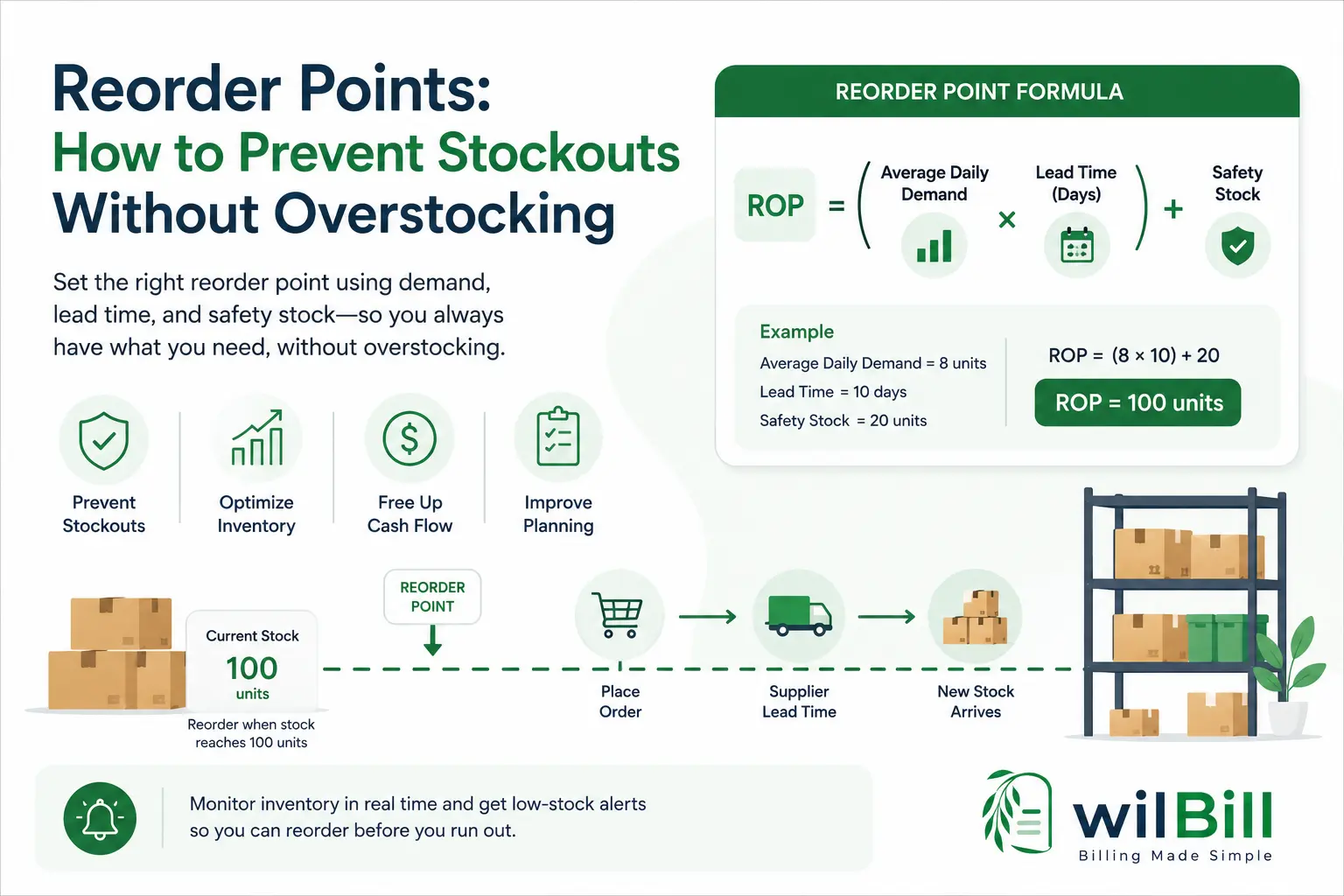
A reorder point (ROP) is the predetermined inventory level that triggers replenishment so replacement stock arrives before existing inventory runs out. The standard formula is Reorder Point = (Average Daily Demand × Lead Time in Days) + Safety Stock. Average daily demand represents normal sales velocity, lead time covers total transit and receiving days from purchase order placement, and safety stock acts as an operational cushion absorbing demand spikes and supplier delays.
Key Takeaways
- •Standard Formula: Reorder Point = (Average Daily Demand × Lead Time in Days) + Safety Stock.
- •A reorder point answers WHEN to reorder, while Economic Order Quantity (EOQ) answers HOW MUCH to order.
- •Lead time is a multiplier: small delays in supplier processing or transit drastically increase stockout risks.
- •Account for total inventory position (On-Hand + On-Order − Committed) rather than physical shelf stock alone.
- •Recalculate reorder thresholds quarterly and adjust prior to predictable seasonal demand spikes.
Most small businesses set reorder points by picking a number that feels safe and adjusting it after something goes wrong.
That usually means one of two things happens: a product runs out before the next shipment arrives, or too much cash gets tied up in inventory that isn't selling quickly.
A reorder point gives you a better way to decide when to replenish stock.
Instead of guessing, you use your sales velocity, supplier lead time, and a safety-stock buffer to determine the inventory level at which it's time to place a new order.
This guide explains the reorder point formula, how to calculate safety stock, how lead time and demand variability affect the calculation, and when to adjust your thresholds as your business changes.
A properly set reorder point ensures that when stock hits the trigger threshold, incoming replenishment arrives right as existing working stock reaches the safety buffer.
What Is a Reorder Point?
A reorder point (ROP) is the inventory level at which a business should start replenishing a product so that the new stock arrives before the existing inventory runs out.
The core question behind a reorder point:
“How much inventory will we need while we're waiting for the next shipment to arrive?”
1. Expected Demand During Lead Time
The number of units your customers will purchase while the supplier processes, manufactures, ships, and delivers your order.
2. Safety Stock Buffer
Extra cushion inventory held to absorb unexpected sales spikes, freight disruptions, or supplier manufacturing delays.
The Danger of Miscalculating Reorder Points:
- Set too low: You risk stockouts, lost sales, unfulfilled orders, and frustrated customers before new inventory arrives.
- Set too high: You reorder prematurely, tying up cash in holding costs and risking product obsolescence.
- Key distinction: A reorder point answers when to reorder, not how much to order.
The Reorder Point Formula
Average Daily Demand
If a product sells 2,400 units over 300 selling days: 2,400 ÷ 300 = 8 units/day. Use enough historical data to avoid temporary outlier distortions.
Real Supplier Lead Time
Includes PO processing (2d) + vendor manufacturing (4d) + freight (3d) + receiving/put-away (1d) = 10 total days. Don't just rely on advertised freight time.
Safety Stock Cushion
Extra units held to absorb delivery delays, unexpected sales spikes, or transit bottlenecks. More volatility requires a larger buffer.
Calculating Reorder Point for SKU-101
Trigger: When available inventory reaches approximately 100 units, initiate replenishment immediately so the replacement arrives before safety stock is breached.
How to Calculate Safety Stock
Safety stock is often the most challenging part of inventory planning because it guards against uncertainty rather than simple averages.
Practical Demand-Variability Safety Stock Rule of Thumb
Example: If average daily demand is 8 units, peak observed demand is 14 units, and lead time is 10 days:
(14 − 8) × 10 = 60 units of safety stock.
Risk of Too Little Safety Stock
- Stockouts on peak sales days
- Emergency expedited freight fees
- Lost revenue and damaged client trust
- Production downtime
Risk of Excessive Safety Stock
- Tied up working capital
- High warehouse holding & storage costs
- Inventory obsolescence & shrinkage
- Spoilage for perishable goods
How to Set a Reorder Point Step by Step
Calculate Average Daily Demand
Review recent sales history and calculate typical units sold per day. Avoid basing demand solely on a single abnormal spike.
Measure Actual Supplier Lead Time
Track actual calendar days from purchase order submission to sellable shelf stock, including processing, transit, and receiving.
Look for Demand Variability
Compare baseline sales against peak periods. Volatile products require wider safety buffers than predictable staples.
Set a Safety Stock Buffer
Apply a demand-variability formula or statistical service-level model aligned with your customer stockout tolerance.
Calculate the Reorder Point
Apply the formula: Reorder Point = (Daily Demand × Lead Time) + Safety Stock.
Compare the Result With Real Stockouts
Audit recent inventory logs. If stockouts occurred regularly, your lead time or demand assumptions are too optimistic.
Review the Threshold Regularly
Update thresholds as sales velocity shifts, seasons change, or supplier fulfillment lead times lengthen.
Why Lead Time Matters More Than Most Businesses Think
Lead time directly multiplies your required stock coverage. Even with steady sales, changes in supplier fulfillment speed drastically alter your replenishment point:
Requires 50 units baseline coverage during transit.
Requires 100 units baseline coverage-a 50-unit increase before safety stock!
Tip: Don't automatically use the single longest outlier delivery time ever recorded. Review typical lead times and recent supplier performance (explore our guide to vendor management best practices).
Key Inventory Distinctions: ROP vs. Safety Stock vs. EOQ
| Aspect | Reorder Point (ROP) | Economic Order Quantity (EOQ) |
|---|---|---|
| Answers | When to reorder | How much to order |
| Based on | Daily demand, lead time, safety stock | Ordering costs, holding costs, annual demand |
| Main purpose | Prevent stockouts while keeping lean stock | Minimize total inventory carrying & ordering costs |
| Example Output | Reorder when stock reaches 100 units | Order a batch of 250 units |
Accounting for In-Transit & Committed Inventory
Don't look solely at on-shelf stock. Always calculate your true Inventory Position:
If on-hand stock is 70 units and ROP is 100, but you already have 50 units on an approved purchase order in transit, your inventory position is 120 units-meaning you do not need to place another order immediately.
Real-World Constraints: Seasonality, MOQs, & New SKUs
Seasonal Products
If demand jumps from 10 units/day to 30 units/day in Q4, adjust your baseline daily demand to 30 before peak season begins (30 × 10 = 300 units ROP) rather than relying on annual averages.
Minimum Order Quantities (MOQ)
A supplier may enforce an MOQ of 100 units even if your replenishment need is 40. Your reorder point still governs when to place the PO, while MOQ dictates order batch size.
New Product Launches
Use comparable product velocity as an initial baseline with conservative lead times. Monitor daily sales closely post-launch and recalculate as soon as 30 days of real data accumulates.
Signs Your Reorder Points Need Adjusting
Indicates sales velocity has surged, supplier transit lead times have expanded, or safety stock buffer is set too aggressively lean.
Indicates product demand has cooled or reorder triggers are set too high, unnecessarily locking up valuable operational working capital.
A Simple Reorder Point Checklist
Frequently Asked Questions
What happens if I don't use a reorder point?
Replenishment becomes purely reactive. Staff order when shelves look visibly empty (causing stockouts) or order arbitrarily on calendar dates (tying up working capital in unsold inventory).
How often should reorder points be recalculated?
Quarterly reviews are ideal for stable SKUs. High-velocity items, seasonal goods, or products with new suppliers should be reviewed monthly or right before peak campaigns.
Is a reorder point the same as a low-stock alert?
No. The reorder point is the mathematical threshold governing replenishment decisions. The low-stock alert is the automated software notification triggered when inventory drops to that threshold.
What is the difference between Reorder Point and EOQ?
Reorder Point determines when to place a purchase order. Economic Order Quantity (EOQ) determines how much quantity to purchase in each batch to minimize ordering and holding expenses.
Should I use the maximum supplier lead time?
Not automatically. Using the absolute worst delivery delay ever recorded artificially inflates your inventory holding levels. Instead, use an accurate typical lead time and absorb rare outlier delays with a dedicated safety-stock buffer.
Final Takeaway: Turn Thresholds Into Automated Replenishment
Calculating the reorder point is only half the battle. The other half is knowing the exact moment inventory reaches that trigger point.
When stock levels are tracked across dozens of products, manual spreadsheets inevitably miss items crossing the threshold. Automated inventory tracking, real-time stock decrement on sales, and automatic low-stock notifications turn mathematical thresholds into actionable purchasing alerts before stockouts occur.
Track Stock & Automate Reorder Alerts
Eliminate stockout surprises and avoid overstocking cash drains. Manage products, set automated reorder thresholds, generate instant purchase orders, and maintain full visibility across inventory and billing in WilBill.
Ready to Streamline Billing & Purchasing?
WilBill connects purchase orders, vendor bills, inventory tracking, and client invoicing in one seamless workspace.
Related Guides
Vendor Management Best Practices: Building a Reliable Supplier Base as You Scale
Learn practical vendor management strategies for small businesses, from onboarding and performance reviews to payment terms, risk, and supplier diversification.
Purchase Order vs. Vendor Bill: What's the Difference and When Do You Need Both?
Purchase orders and vendor bills serve different purposes. Learn when to use each, how they connect, and how three-way matching prevents overpayment.